
This article explains simple step-by-step methods to check the mobile number registered with your Aadhaar card using both offline and online options, helping users easily identify their Aadhaar-linked mobile number.
Aadhaar is an essential identity document in India for banking, government schemes, PAN linking, and online verification. Many people forget their registered mobile number due to SIM changes or old enrollment, which can cause OTP issues. This guide explains how to find and update the linked number.
Why Aadhaar Registered Mobile Number Is Important
The mobile number registered with Aadhaar acts as a security layer for identity verification. OTPs are sent to this number whenever you try to access Aadhaar services online.
It is required for downloading e-Aadhaar, updating Aadhaar details, completing e-KYC for banks and mobile connections, verification during competitive exam forms, and linking Aadhaar with government welfare schemes.
If the registered mobile number is not accessible, you may get stuck during important online processes, making it necessary to know or update it as early as possible.
Common Reasons People Forget Their Aadhaar Registered Mobile Number
One of the most common reasons is change of mobile number over time. Many people replace their SIM cards but forget to update Aadhaar details.
Another reason is Aadhaar enrollment done by parents or guardians, especially for children or students, where the registered number belongs to a family member.
In rural areas, Aadhaar enrollment was often done through local camps or post offices, and people were not properly informed about the registered mobile number.
Method 1: Through Your Aadhaar Card or Aadhaar Enrollment Packet
When Aadhaar enrollment is completed through a post office or enrollment centre, UIDAI sends an Aadhaar packet to the applicant’s address.
This packet is usually a long envelope that contains Aadhaar details, enrollment acknowledgment, and sometimes the registered mobile number in printed or masked form.
Carefully check the contact or personal details section of the packet. Many users are able to identify the Aadhaar registered mobile number from these documents.
This method is helpful for people who still have their Aadhaar post-delivery documents safely stored at home.
Method 2: Through UIDAI Official Website
The official UIDAI website provides a secure way to verify Aadhaar details and confirm whether a mobile number is registered or not.
Step 1: Open Google in your mobile or computer browser and search for UIDAI.
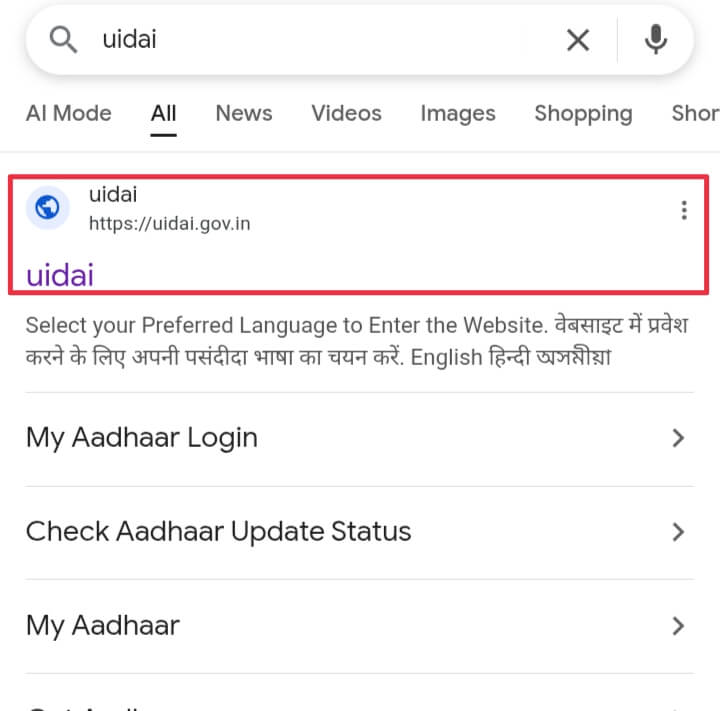
Step 2: Click on the official UIDAI website shown in the search results and avoid clicking on unofficial or sponsored links.
Step 3: Scroll down on the homepage and locate the Aadhaar Services section.
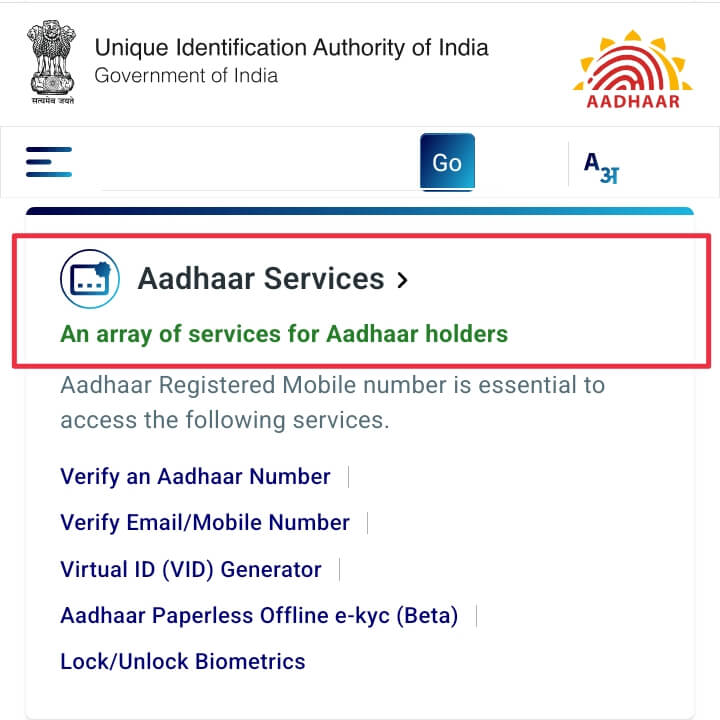
Step 4: Tap on the appropriate Aadhaar-related service option to proceed further.
Step 5: On the next page, enter your 12-digit Aadhaar number along with the captcha code displayed on the screen.
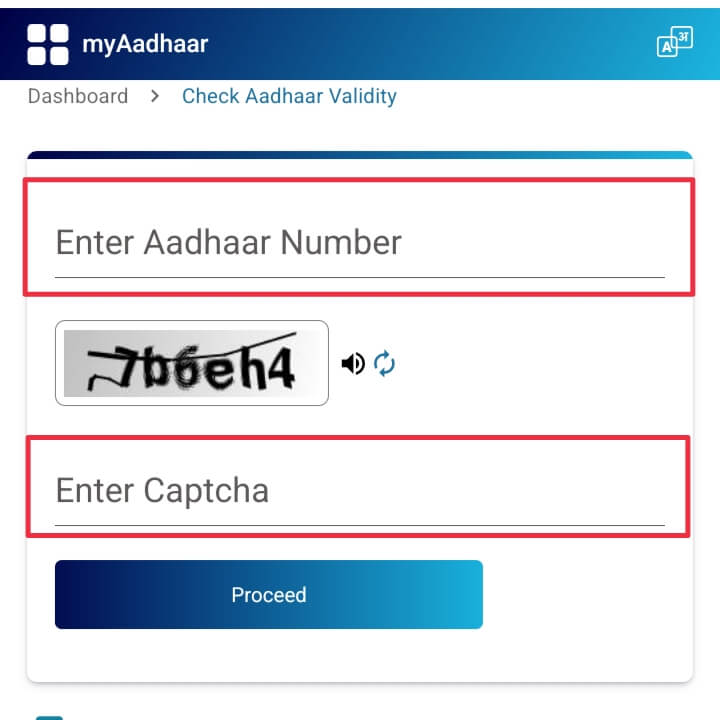
Step 6: Carefully review the entered information and tap on the proceed or submit option.
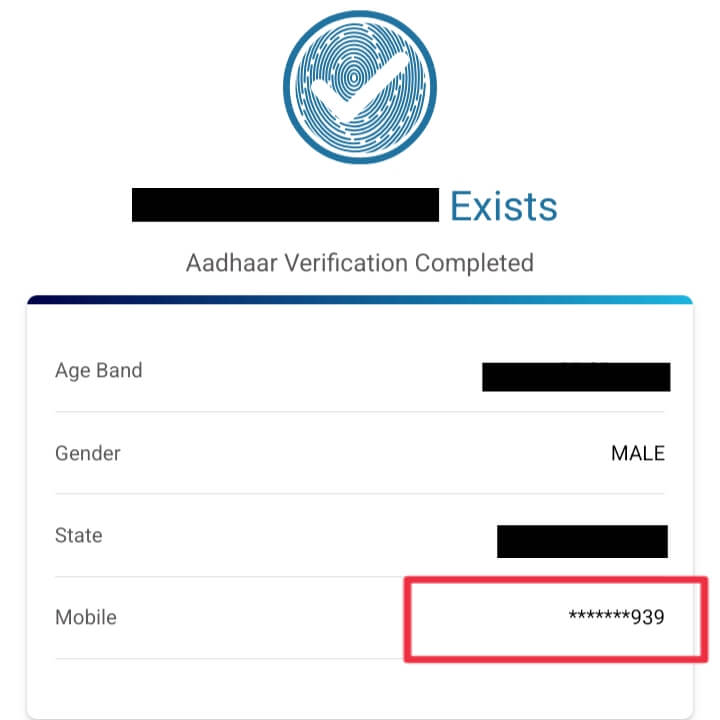
Step 7: Now a new page will appear with your Aadhaar statistics including your registered mobile number
Understanding Masked Mobile Number Display
For privacy and security purposes, UIDAI never shows the complete mobile number on the screen.
The mobile number is displayed in masked format, usually showing only the last two or four digits. This helps the user recognize the number without exposing it fully.
This ensures protection against misuse of personal data.
What If OTP Is Not Received?
If OTP is not received during verification, it usually means that the registered mobile number is different from your current number or has been deactivated.
Sometimes OTP delivery may be delayed due to network issues, so waiting for a few minutes and retrying is recommended.
If OTP still does not arrive, the only solution is to update your mobile number through an Aadhaar Seva Kendra.
How to Update Aadhaar Mobile Number
To update your Aadhaar registered mobile number, visit the nearest Aadhaar Seva Kendra or authorized enrollment centre.
No documents are required for mobile number update, but biometric verification such as fingerprint or iris scan is mandatory.
Once the request is submitted, an acknowledgment slip is provided for reference.
How Much Time Does Mobile Number Update Take
Mobile number update requests usually take between three to ten working days for processing.
After successful update, a confirmation SMS is sent to the newly registered mobile number.
Important Safety and Security Tips
Always use the official UIDAI website for Aadhaar-related services.
Never share your Aadhaar number or OTP with unknown individuals.
Stay alert against fake calls or messages asking for Aadhaar details.
Frequently Asked Questions
Many users ask whether it is possible to check the Aadhaar registered mobile number without OTP. Offline documents may help, but online verification usually requires OTP.
Another common question is whether Aadhaar mobile number update requires documents. The answer is no, but biometric authentication is compulsory.
Users also ask whether full mobile numbers can be seen online, which is not allowed due to privacy policies.
Conclusion
Knowing your Aadhaar registered mobile number is essential for accessing digital services without interruption.
Whether by checking Aadhaar enrollment documents or using the official UIDAI website, the methods explained above are secure and reliable.
If you are unable to access the registered number, visiting an Aadhaar Seva Kendra and updating your mobile number is the best long-term solution.
Important Weblinks of Aadhaar Service
| UIDAI Official Website | Click Here |
| Know Aadhaar Centre | Click Here |
| Enrolment Update Form | Click Here |
| Download Aadhaar | Click Here |
| Aadhaar Login Portal | Click Here |
| My Aadhaar App | Click Here |
| New Aadhaar App | Click Here |
| Our WhatsApp Channel | Click Here |


-EXAM-E-BOOK-(1500-x-720-px).webp)